DLL Hijacking: How Dangerous Can a Single DLL Be?
Almost every program we use daily calls dozens, maybe hundreds, of DLLs in the background. Much of the critical functionality of the operating system and of applications rests on these small files. But can these small, unremarkable files become a doorway to full system compromise in the wrong hands? In this post we will show just how common and invisible DLLs are, and then walk step by step through how that invisibility can turn into risk.
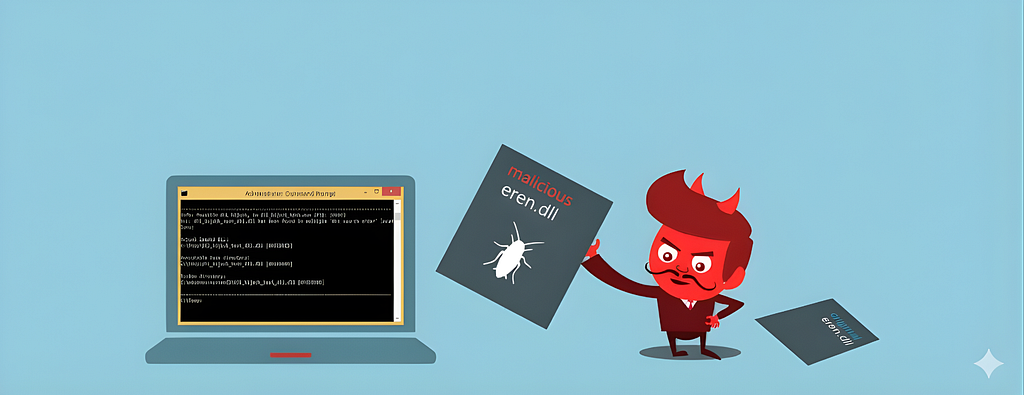
DLL hijacking is a cyberattack technique that runs malicious code by manipulating the process a legitimate application uses to load a Dynamic Link Library (DLL).
What Is a DLL?
A DLL (Dynamic Link Library) is a file containing reusable code and data that multiple programs can use at the same time to perform different functions, improving efficiency and modularity in software development. On Windows operating systems, most of the OS's functionality is provided by DLLs. This is why many DLL hijacking attacks stem from the operating system's and applications' heavy dependence on DLLs.
Why Are DLLs Used?
- Reuse (the same code is used by more than one application)
- Ease of updating & patching (when an update ships, only the relevant DLL is updated instead of the whole application)
- Smaller files (the main .exe is kept minimal)
How Does a DLL Work?
When an executable (.exe) is run and the program needs a DLL, the operating system searches for the required DLL file in certain directories. Once the file is found, it is loaded into memory and made available to the program.
DLL Search Order
When a DLL is needed, the DLL loader starts searching for it on the system.
On Windows, the DLL search order is generally as follows:
- The directory the application was loaded from
- The system directory (C:\Windows\System32)
- The Windows directory (C:\Windows)
- The current working directory
- The directories listed in the Path environment variable
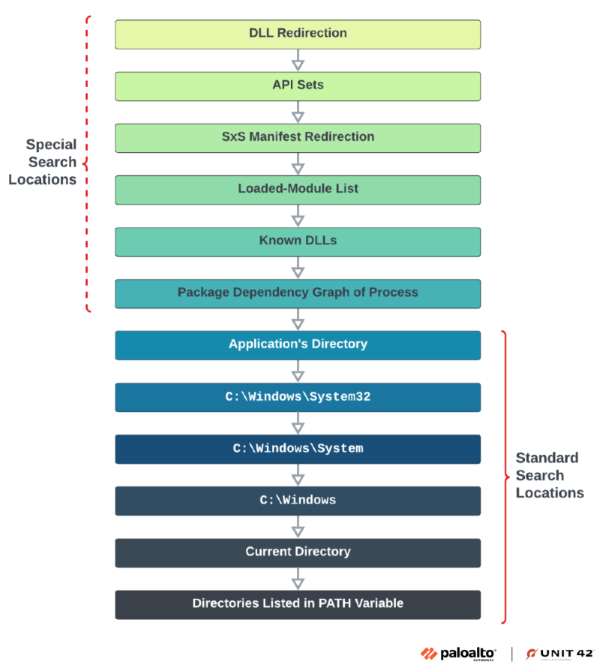
This ordering is critically important for DLL hijacking. During this search, we can inject our own malicious DLL into the location where the innocent DLL is expected. This is the very basis of the DLL hijacking attack.
What Is DLL Hijacking?
DLL hijacking is one of the serious threats in cybersecurity. Attackers run malicious code by manipulating the process a legitimate application uses to load its dynamic link libraries (DLLs). This method takes advantage of weak configurations such as misconfigured search paths or writable directories, and can be used for privilege escalation or to establish persistent access.
How Does DLL Hijacking Work?
The core idea is to abuse the search order the operating system uses to find and load DLLs. For example, if an application is looking for a library called "eren.dll", the attacker creates a DLL with the same name that carries a malicious payload inside it. If the original eren.dll sits in a directory that is checked later in the search order, the attacker places their malicious DLL in a directory the loader checks first. As a result, the operating system loads the attacker's DLL instead of the original file, and the malicious code is executed.
Common DLL Hijacking Techniques
- Missing DLL Load
- Search Order Hijacking
- Phantom DLL Hijacking
- DLL Sideloading
Missing DLL Load
This situation arises when a DLL an application needs is not present in the right place / is missing. The attacker can run malicious code by placing a fake copy of the missing DLL in the location being searched.
For example: the application eren.exe needs helper.dll and tries to load it, but if the installation is incomplete the loader will check the other search locations. If the attacker places helper.dll directly in the location where the file is searched for, the malicious code will run.
Search Order Hijacking
This is the most classic and quite common DLL hijacking method. The attacker exploits a program's DLL search order to make a malicious DLL with the same name load in place of the original DLL.
Phantom DLL Hijacking
This arises when an application searches for a DLL file that does not exist. If the attacker places their own malicious DLL in the location where the missing module is searched for, the application will run the file.
For example: after an update, the application eren.exe no longer uses helper.dll directly. But if the application still tries to search for and load this DLL, the attacker can make the application load malicious code by placing a malicious DLL with the same name in the location where the DLL is searched for.
DLL Sideloading
This technique copies a legitimate application, together with its folder, into a directory where read/write permissions are open, so that a malicious version of the DLL it runs from its current folder gets executed. For example, an application called eren.exe loads and uses helper.dll from its own directory when run. If the attacker places a helper.dll carrying a malicious payload — with the same name as the DLL eren.exe runs — into a different folder with write/read permissions such as tmp, and then runs the application from that tmp folder, the operating system will run the malicious DLL.
HANDS-ON
We have learned what DLL hijacking is and its attack vectors. Now let's see in practice, from an attacker's point of view, how DLL hijacking is done, by testing it on a virtual machine.
First we need to pick an application on which we can test the DLL hijacking vulnerability. For this we need to identify files on the system where our read/write permissions are open. There is a resource that will speed this up a great deal: HijackLibs.
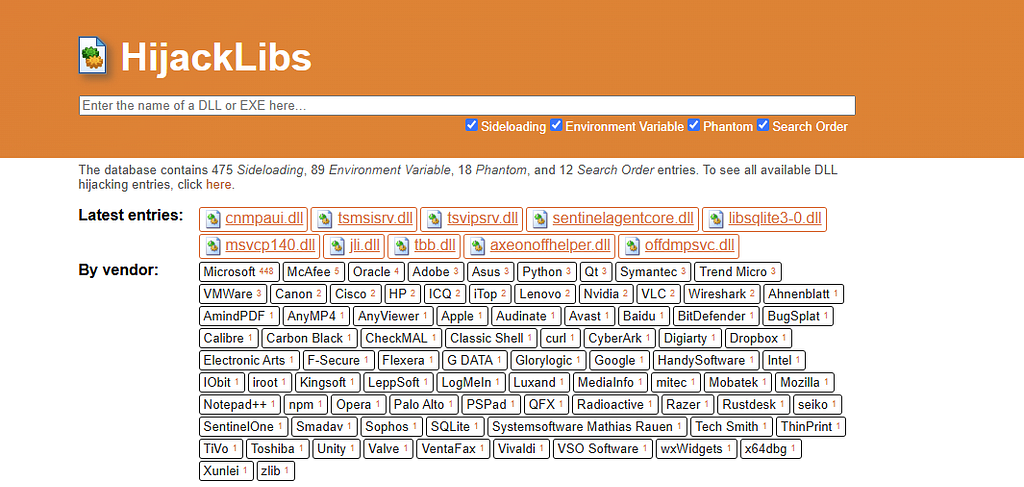
It is an open-source database that categorizes which programs on the system call which DLLs and the vulnerabilities of those DLLs. From here you can discover potentially vulnerable DLLs, and you can also use the YARA rules the site provides to build rules that automatically detect these weak DLL files and take precautions.
In this scenario we will use the GitHub tool called "Siofra" for DLL hijacking detection and attack.
What Is Siofra?
Siofra is a tool designed to detect and exploit DLL hijacking vulnerabilities in Windows programs.
Its key features:
- PE/EXE analysis and dependency extraction
- Simulating which DLLs the application will look for and where, and reporting hijack vulnerabilities.
- Producing a payload-carrying DLL for a targeted DLL name with infect mode.
- Modes for inspecting both on-disk and runtime behavior.
1. Vulnerability Analysis
Normally, before starting an attack scenario, we perform thorough reconnaissance and information gathering about the target system, both externally and internally. In this scenario, however, our goal will be to use a vulnerability targeting the Explorer application that is present by default on all Windows systems. So we will proceed with our steps knowing the vulnerability is present in the Explorer application.
First, we will run a vulnerability scan with Siofra on the application we suspect has a DLL hijacking vulnerability.
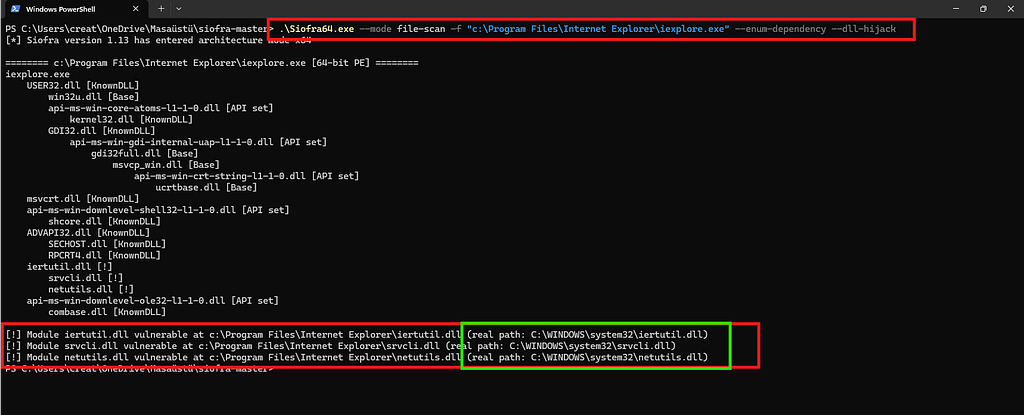
This command simulates the DLL loading behavior of the iexplorer.exe file we selected. It examines which DLLs it searches for and in what order, and checks which directory the target DLL actually resides in. If the loader searches another directory before the one the DLL lives in, the tool reports that file to us with the "Vulnerable" label.
In the screenshot, three files appear on which we can perform DLL hijacking. Here we will try to exploit the iertutil.dll file. Explorer first looks for iertutil.dll under the "C:\Program Files\Internet Explorer" directory. But the original location of iertutil.dll is the "C:\Windows\System32" directory.
Why Is This a DLL Hijacking Vulnerability?
The core problem here is that the application calls the DLL by name only, rather than by full path, and trusts the operating system's default search order.
How Is It Exploited?
If we create a malicious DLL named iertutil.dll and place it in the location the program looks at first — that is, under "C:\Program Files\Internet Explorer" — then because the loader checks that directory before the original DLL location, it will think it has found the DLL it was looking for and will run our malicious DLL.
2. Creating the Malicious DLL
To exploit the vulnerability on the target machine, we need to create our own malicious file. In this scenario I will use the msfvenom tool available in Kali Linux to create a DLL payload that opens a reverse shell connection back to the attacker's computer. Since our topic is not how to create payloads, I will only add its screenshot.

3. Placing the Malicious File on the Target Computer
If we send our payload to the target computer this way, the payload will run at the end of the process — but because our payload does not perform the work the original iertutil.dll does, Explorer will not run. To solve this, we will use our Siofra tool again;
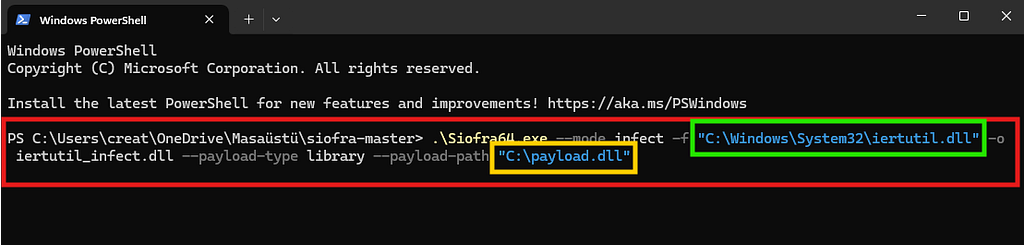
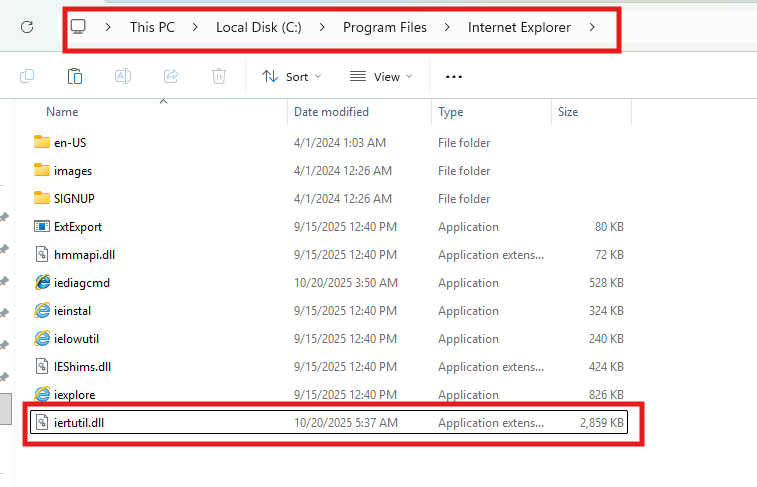
The command shown in the image takes a copy of our original iertutil.dll file and rebuilds it so that it also runs payload.dll. Finally, we place this new malicious iertutil.dll file under "C:\Program Files\Internet Explorer", the location where the application looks for the DLL first.
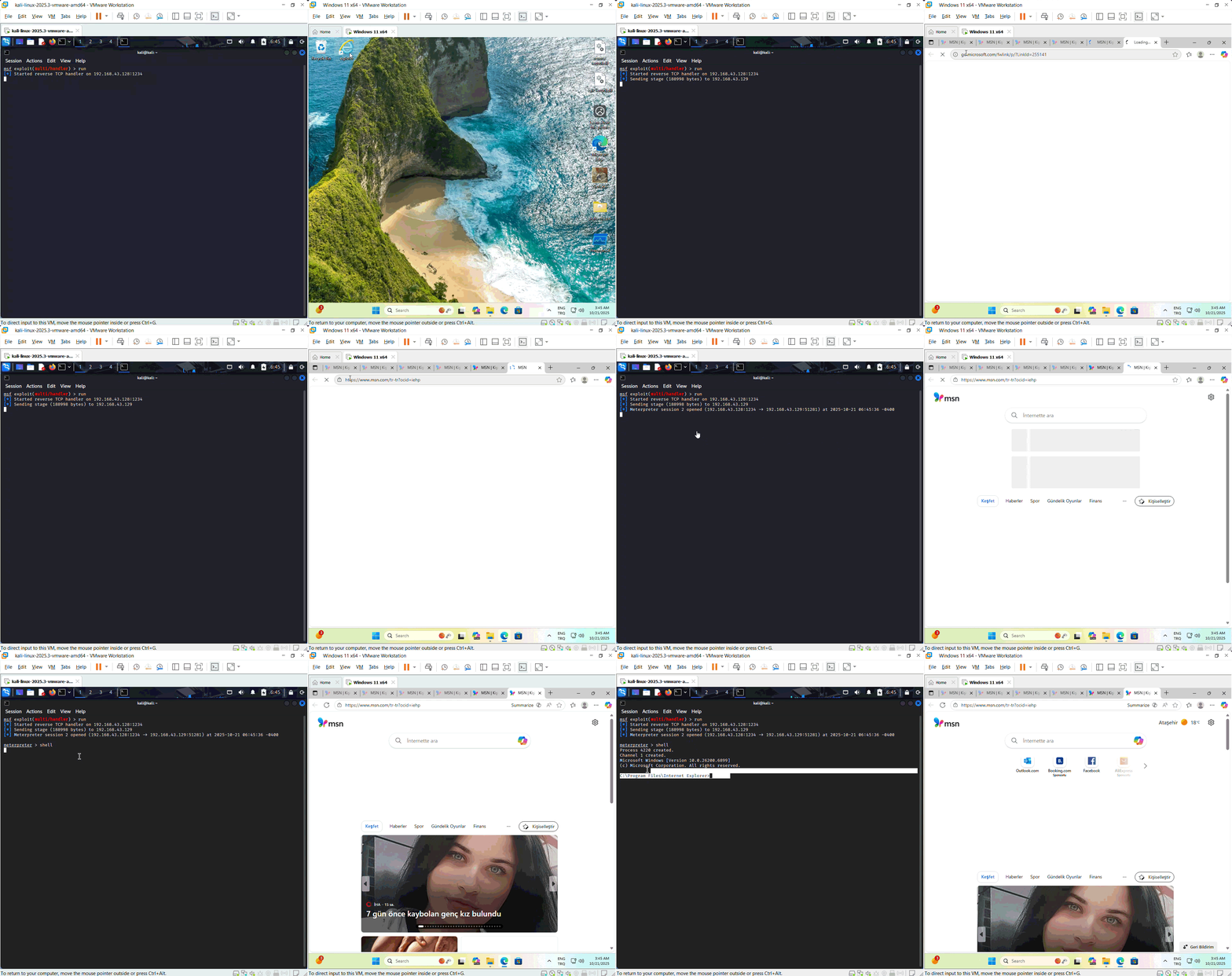
As seen in the GIF below, every time Explorer runs, our malicious payload is triggered in the background and provides a reverse shell. Because we wrote over the real DLL instead of running the malicious payload directly, Explorer continued to work normally. With this method it becomes harder for the user to notice our malicious code.
Prevention and Mitigation Strategies
Although it is not always possible to prevent DLL hijacking attacks entirely, the risk can be greatly reduced with the right precautions.
- DLL Verification
All applications and DLL files should be digitally signed, and the signature value should be verified at runtime. This way the system can detect a DLL file that has been swapped out for the original.
2. File System Permissions
User privileges should be restricted in system directories such as C:\Program Files and C:\Windows.
3. Secure DLL Loading Methods
DLLs should be loaded using safe APIs such as SetDefaultDllDirectories or LoadLibraryEx. In addition, when DLLs are called, the full file path should be specified rather than leaving it to the default search path.
4. Software Updates
The operating system and software should be updated regularly. Files containing known DLL hijacking vulnerabilities should be patched.
For other mitigation methods for DLL hijacking and more, you can check out the MITRE ATT&CK page.
Conclusion
Although DLL hijacking is a rarely seen type of attack, when used it is both a simple and effective attack vector. It can be largely prevented with proper engineering and methods. In this post I covered what a DLL is, how attackers exploit these libraries, and defense methods, together with practical examples. I hope it was useful.